
Pitch and texture
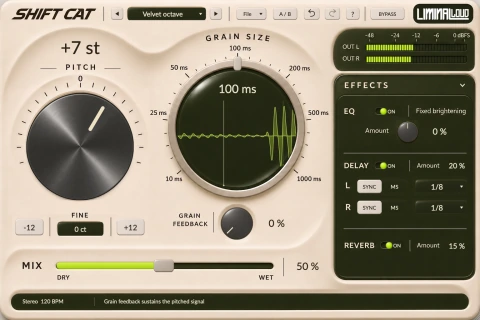
Granular pitch shifting: grain size, pitch and feedback
Granular pitch shifting processes short pieces of incoming audio as grains. Grain size, pitch and feedback shape the result: a setting can reinforce a phrase, scatter it into texture or build a repeating pitched layer.
Shift Cat gives you grain-size, pitch, feedback and dry/wet control for this kind of processing. Start with a source you know well so you can hear which change belongs to the shifter.
Choose one source and one musical job
A held chord makes a useful first source because the grain texture remains audible between attacks. A vocal phrase reveals how processing treats syllables, while percussion exposes changes around the front of a hit.
Pick a goal before building feedback. You might want an octave layer under a synth, a pitched response behind a vocal or an unstable transition at the end of a phrase. The same setting rarely serves all three jobs equally well.
Hear the grain size before adding a large shift
- Lower feedback. Keep repeated material from dominating the first comparison.
- Set a modest pitch change. Choose an interval you can recognize against the original.
- Compare shorter and longer grain settings. Listen to sustained texture as well as the start of each note.
- Set the blend. Bring back the dry source when the original attack or wording needs to stay clear.
Grain size changes the time scale of the processing. Listen for a texture that suits the source, rather than assuming one end of the control is always cleaner. Recheck after changing the interval, because grain behavior and pitch interact.
Choose the interval in the arrangement
Try an octave for an easily understood layer. Smaller shifts can create a denser, less stable relationship with the dry sound. Wider intervals can make the processed branch feel like a separate part.
Bring the bass or chord reference back into the loop before committing. A shift that works on one note may clash with a later note or change the perceived register of the phrase. Use host automation or separate processing where the arrangement needs a different treatment.
Treat feedback as part of the composition
Raise feedback gradually and listen through several repetitions. Check what happens after the source stops. A pitched tail can fill the intended gap, overlap the next phrase or become louder and denser than expected.
Keep your monitor level comfortable and reduce the final track level as needed. When comparing two feedback amounts, let the previous tail clear first. Otherwise, the sound left from the earlier setting can obscure the change you are trying to assess.
Compare the order of processing
Putting the pitch shifter before distortion changes the material that reaches the distortion. Putting it afterward shifts an already-colored signal. Try both at restrained amounts and compare the attack, sustained tone and decay separately.
For a stable performance underneath a changing texture, keep some dry source and automate the processed amount around phrase endings. For an obvious transition, print the processed passage to a new audio track in your DAW, then edit that recording as part of the arrangement.
Granular pitch shifting is a different job from vowel filtering. If you want mouth-like articulation while retaining the source's musical note, the talking-bass guide offers another starting point. If the goal is an expanding pitched atmosphere, explore Hall and Shimmer reverb.