
Vowel filtering
How to make talking bass with a vowel filter
To make talking bass, feed a harmonically rich sound into a vowel filter, choose two vowel positions and move between them in time with the phrase. The filter changes the sound's resonant character; the original source supplies the note and rhythm.
This walkthrough uses YOIBOI. For a free starting point, INFORMANT offers a two-resonance Vowel field alongside its separate Character mode.
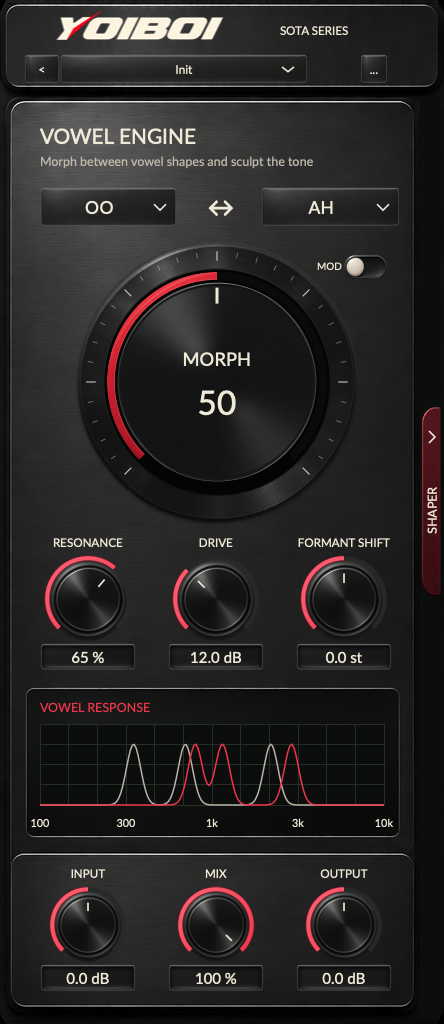
Choose a source that gives the filter something to shape
A sustained saw, a driven bass or a dense vocal chop makes a useful starting source. A nearly pure sub has little upper-frequency material for a vowel filter to emphasize. Increasing resonance alone can produce a loud whistle without making the bass more intelligible.
Loop a short phrase with a clear gap at the end. Listen to the source with the kick playing, then insert the filter. Keep the monitoring level steady throughout the comparison. The useful question is whether the vowel makes the bass phrase easier to recognize.
Find the two mouth shapes before adding motion
- Leave YOIBOI's MOD off. Choose OO as the left vowel and AH as the right vowel.
- Turn MORPH slowly. Zero selects the left endpoint; 100 selects the right. Listen for a useful change through the middle of the movement.
- Try OO to EE. Compare that wider contrast with the first pair using the same source.
- Adjust Resonance and Mix. Start with enough dry sound to retain the source's attack. Raise resonance only while the vowel remains useful in the arrangement.
Drive adds harmonic excitation inside YOIBOI's vowel engine and can increase level. Trim Output when you increase it. Formant Shift moves the vowel centers; use your source instrument or audio pitch processing when the musical note needs to change.
Draw one clear gesture
Open SHAPER, select a pattern, set Target to MORPH and choose Length 1 BAR. Turn MOD on with the DAW transport running. At full Depth, the curve controls the target's full range; lower Depth brings the movement closer to the manual setting.
Begin with one rise and fall. Place its highest point near an accent in the source and listen for the return to the starting vowel. Add a second gesture only when the phrase needs another syllable. Dense curves can blur the rhythm that made the source work.
Folding the editor keeps modulation running. The large Morph control follows the effective value when Morph is the target. Selecting another target, such as Resonance or Mix, changes which control the curve drives.
Give neighboring phrases different roles
YOIBOI has 24 editable patterns across banks A, B and C. Keep a simple movement for the main phrase, a shorter answer for the response and a slower gesture for the transition. Change patterns with DAW automation where the arrangement calls for a new articulation.
Target MIX can alternate processed and dry passages. A low part of that curve restores the source; it does not mute or rearrange the incoming audio. That distinction matters when drawing gaps around drum hits.
Try the free vowel-field approach
INFORMANT's Vowel mode lets you move two resonances through an X/Y field and add motion. Its Character mode instead shifts spectral-envelope character. The INFORMANT formant-shifting guide explains those workflows and their relationship to pitch.
Keep whichever approach makes a useful phrase with the fewest adjustments. Check the result with the kick, at a matched level, before adding another distortion or widening stage.