
Spatial sound design
Spatial panning: how to move sounds through a stereo mix
For spatial movement in a stereo mix, choose a sound that can move without weakening the track's main rhythm, give it a readable path and check the result on headphones, speakers and in mono. Distance, reflections and pitch motion affect the impression as well as left-to-right position.
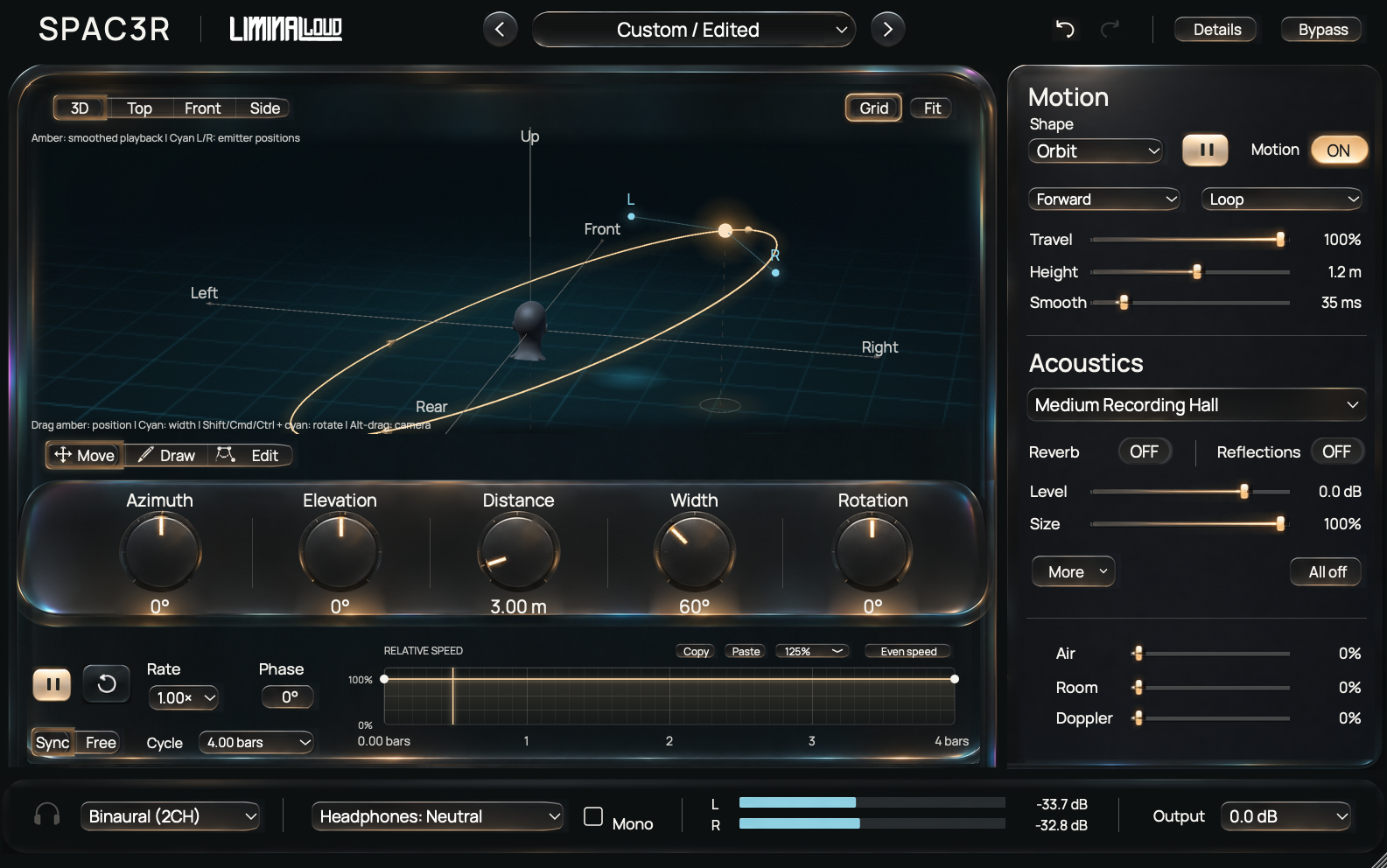
SPAC3R provides a listener-relative stage, editable motion paths, stereo emitters and acoustic controls. It is useful for moving a detail through the arrangement while keeping the main vocal, kick or bass center intentional.
Choose a part with room to travel
Try a percussion fill, a sustained texture, a vocal effect or an occasional synth response. Keep a centered reference playing while you work. It is easier to judge movement against something steady than when every element is moving at once.
Start with a short phrase and include the transition into the following section. A path that sounds exciting in isolation may draw attention away from the next downbeat. Decide where the movement should end before making the route more complicated.
Make the route easy to understand
- Choose a simple path. Compare Pendulum with Orbit using the same source and a consistent level.
- Set the cycle timing. Use session-synced timing when the movement should repeat with the phrase, or a free rate for an evolving texture.
- Adjust Phase. Place a useful point in the motion near the musical accent you want to emphasize.
- Edit the route. Draw or move nodes when the preset path takes the sound somewhere you do not need.
Use Top, Front and Side views to inspect a path. A single perspective can make two positions look similar even when their depth or elevation differs. Return to listening after each meaningful edit.
Shape the speed around the phrase
The relative-speed graph changes where the moving sound lingers or accelerates. Keep the first comparison simple: let the sound remain near its important accent, then travel during the gap or tail.
For a custom path, listen to the whole cycle rather than judging only its most dramatic turn. Smooth movement may suit a pad, while a faster transition may suit a fill. Keep the motion tied to the role of the source.
Add distance and stereo width deliberately
SPAC3R separates Reverb and Reflections, with Air, Room balance and Doppler contributing to the acoustic treatment. Establish the route with restrained amounts, then introduce the depth and motion cues that support it.
Width changes the relationship between the stereo emitters, and Rotation changes their orientation. A wide source can make its center harder to follow. Compare a narrower setting before adding a more elaborate route.
Doppler can make movement part of the pitched character. Check it against tuned instruments and sustained notes. Leave output headroom while comparing positions; spatial processing can change peaks and level across the route.
Check several listening conditions
Headphones and loudspeakers present spatial cues differently. A convincing headphone position may read as a smaller movement on speakers. Check the part in the full mix and keep the dry or centered reference available.
Sum to mono and listen for changes in the part's level, texture and rhythmic importance. The stereo-width and mono-compatibility guide covers a repeatable listening comparison.
A spatial effect in a stereo signal chain does not turn the export into an object-based immersive session. Choose delivery formats in the DAW and use the movement where it improves the actual mix your listener will receive.