
Sidechain and ducking
How to sidechain kick and bass with a free volume shaper
To make room for a kick, put a volume shaper on the bass and lower the bass gain around each kick hit. Use a repeating curve for a steady beat, or trigger the curve from the kick when the rhythm changes.
HELLAFLO is a free sidechain and volume-shaping plugin with both approaches: Tempo Loop and Follow Kick. This guide starts with the free edition. HELLAFLO+ adds a larger modulation system; the basic kick-and-bass workflow below uses HELLAFLO.
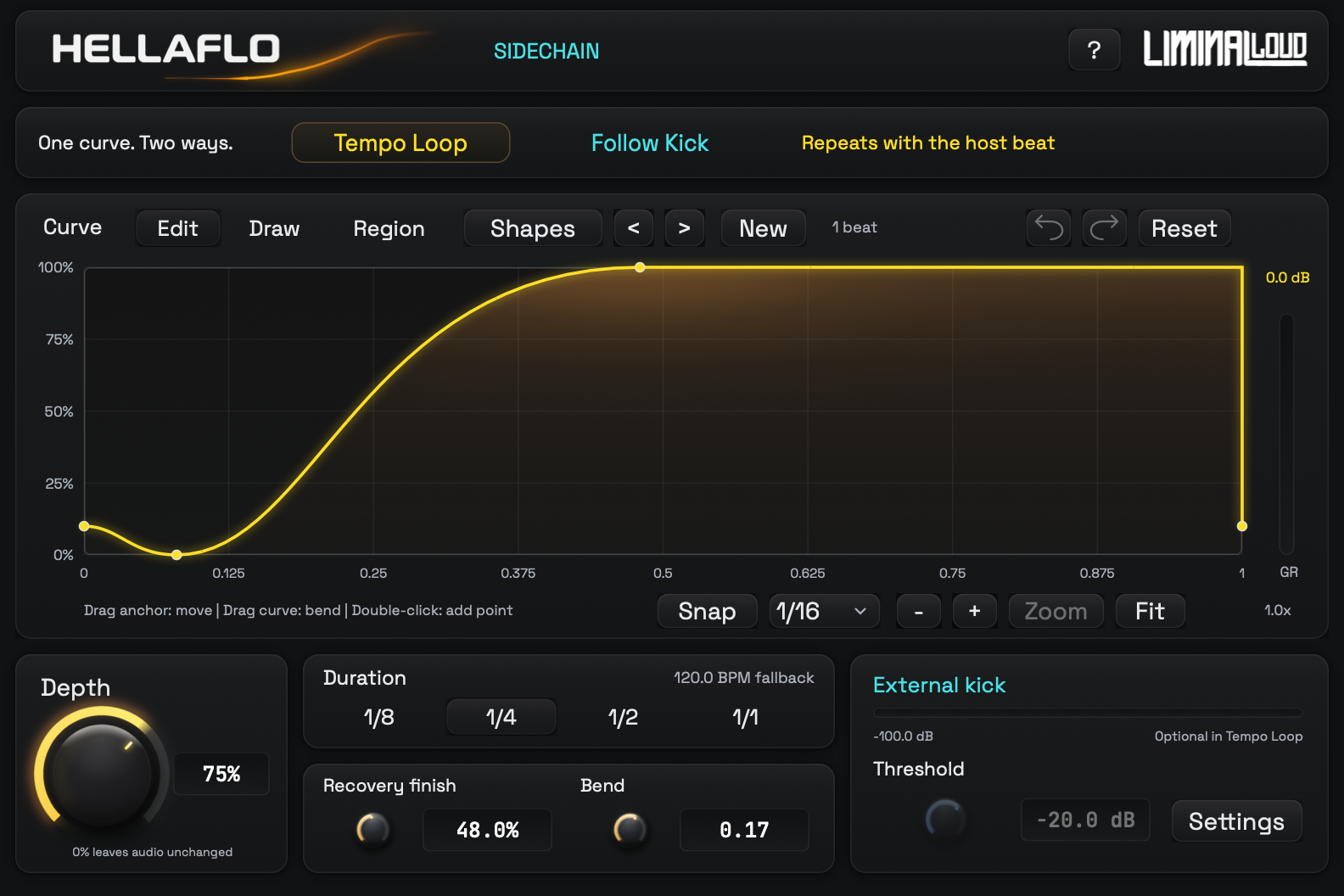
Choose a loop or an external kick trigger
Tempo Loop repeats the gain curve with the host beat. It is a convenient starting point for a regular four-on-the-floor pattern. The kick does not have to be routed into the plugin, but you need to align the repeating dip with the beat you want to emphasize.
Follow Kick starts the curve when the external kick detector accepts a hit. Use it when your kick pattern contains gaps, fills or syncopation. The kick controls the ducking; the bass still enters through the plugin's normal audio input.
Start with Tempo Loop
- Insert HELLAFLO on the bass track. Play a section where the kick and bass overlap.
- Select Tempo Loop. For a regular quarter-note kick, try a 1/4 cycle as the first setting.
- Start at 75% Depth. Cycle through the ducking shapes, then choose a curve that makes space at the start and recovers before the next important bass note.
- Check the groove in context. Lower Depth if the bass disappears too far. Change the recovery shape if it comes back too late or crowds the kick tail.
Depth scales how much of the drawn curve is applied. At 75% Depth, a graph value of zero produces 25% remaining gain, about −12 dB. The graph shows the full-depth shape; the gain-reduction readout shows the attenuation actually applied. That distinction helps when the drawn dip looks deeper than it sounds.
Route Follow Kick when the rhythm changes
- Keep HELLAFLO on the bass. Send the kick to the plugin's external sidechain input using your host's routing.
- Select Follow Kick. Check that the External kick meter responds when the kick plays.
- Set Threshold below the kick peaks. TRIG confirms that the detector accepted a hit. Check quieter kicks as well as the loudest one.
- Listen across a fill and a gap. The bass should duck on the intended hits and recover when the triggered curve finishes.
In Ableton Live, enable the plugin device's Sidechain section and choose the kick track under Audio From. Other hosts name and expose external sidechain routing differently; check their plugin-routing instructions.
When the kick stops, HELLAFLO lets the last triggered cycle finish and then returns to unity gain. It does not truncate that cycle to match the kick's decay. Choose the curve length and recovery with that behavior in mind.
Shape the bass return around the kick tail
A sharp dip can clear the kick attack while a longer dip leaves space for its body. Move Recovery finish later if the bass returns while the kick still dominates the low end. Move it earlier when the bass line feels detached from the beat. Listen to the bass notes themselves: a long duck may remove the front of a note you need to hear.
Bend changes the transition between existing curve endpoints. In HELLAFLO, negative Bend moves the transition later and positive Bend moves it earlier. Start with a simple shape so you can hear what each change does.
If the result still feels wrong
- The meter moves but nothing triggers: check Follow Kick mode, Threshold and the TRIG indicator.
- The bass ducks during a gap: check whether Tempo Loop is still selected, or whether the final triggered cycle is still running.
- The low end feels empty: reduce Depth or shorten the recovery before changing the bass sound.
- The bass distorts or clicks: soften abrupt curve transitions and compare a smoother shape.
Finish by comparing the full drum-and-bass section at a similar listening level. Listen for a clearer kick and a bass line that still carries the rhythm.
Comparing free plugins? Compare HELLAFLO with LFO Tool and Kickstart 2 →